

SSL certificates are about to expire more often. If your website relies on automatic renewal, here’s how to check it actually works, before your visitors see a security warning instead of your homepage.
The little padlock next to your website’s address means your site has a valid SSL certificate. It’s what lets visitors’ browsers trust that they’re really talking to your site, and that nobody can read what they type into your contact form or checkout page.
That certificate doesn’t last forever. When it expires, browsers show a full-page warning that your site is “not secure”. Most visitors leave immediately. Online shops lose sales, and contact forms stop getting messages. It usually happens on a weekend, when nobody is watching.
Millions of websites, including many small business sites in Kenya, use free certificates from Let’s Encrypt, often set up automatically by their hosting company. Those certificates are about to get shorter lives. If your renewal is properly automated, you won’t notice a thing. If it isn’t, you’ll find out the hard way.
This guide explains what’s changing in plain language, and gives you a check you can do in about five minutes.
What’s changing, and when
Let’s Encrypt certificates have lasted 90 days for years. Over the next two years, that drops by half, in two steps.
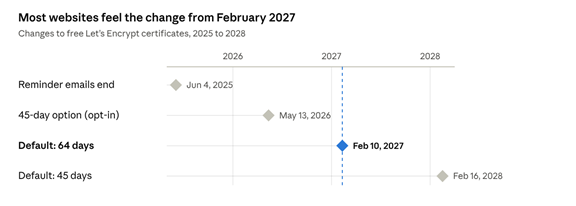
Here’s what each date means for you:
- June 4, 2025: reminder emails ended. Let’s Encrypt used to email you when a certificate was about to expire. It stopped. If your renewal breaks today, nobody will warn you.
- May 13, 2026: an optional 45-day certificate. This is for early adopters and testing. It doesn’t affect you unless you, your host or your developer chose it.
- February 10, 2027: the default drops to 64 days. This is the change most websites will actually feel.
- February 16, 2028: the default drops to 45 days.
Each change applies at your next renewal after that date, not to certificates you already have.
Why is this happening? Shorter certificates limit the damage if one is ever stolen or issued by mistake. It isn’t just Let’s Encrypt: the whole industry has agreed to shorten certificate lifetimes, including for paid certificates (more on that below).
The good news first: if your certificate renews automatically and that automation works, you don’t need to do anything. Let’s Encrypt says most users with automatic renewal won’t need to change anything.
The risk is in setups that only look automatic. Some renew on a fixed timetable, such as “every 60 days”. That works with 90-day certificates, but a 45-day certificate expires long before day 60. Let’s Encrypt’s advice is to renew when about two-thirds of a certificate’s life has passed, rather than on a fixed calendar. Other setups were never automatic at all. Someone renewed them by hand when the reminder email arrived, and that email no longer comes.
The 5-minute check
You don’t need to be technical for most of this. Steps 1, 2 and 4 take a browser and a few clicks. Step 3 is a question you can hand to your host or developer.
Step 1: Find your certificate’s dates (1 minute)
Open your website in Chrome, Edge or Firefox. Click the icon to the left of the address (a padlock or a “tune” icon), then look for Connection is secure → Certificate is valid. You’ll see three things worth noting:
- Issued by: whether it says Let’s Encrypt or another company.
- Valid from: when the current certificate was issued.
- Valid until: when it expires.
If you’d rather not click around, a free online SSL checker shows the same details when you type in your domain.
Step 2: Find out who renews it (1 minute)
Your certificate is renewed by whoever set it up, and that’s not always obvious. The usual cases:
- Shared hosting with cPanel: usually AutoSSL, run by your host.
- Managed WordPress hosting or a website builder: the platform handles it.
- A site behind Cloudflare: Cloudflare usually renews the certificate visitors see, but there may be a second certificate on your server behind it.
- Your own server (VPS): you or your developer, usually with a tool called Certbot.
If you’re not sure, send your host or developer one question: “How is our SSL certificate renewed, and how would we find out if a renewal failed?” A confident, specific answer is a good sign. Silence or “we’ll check” tells you something too.
Step 3: Confirm it’s actually renewing (2 minutes)
Look at the dates from step 1. An automatically renewed Let’s Encrypt certificate is normally replaced well before it expires, so a healthy one usually has:
- a valid from date within roughly the last two months, and
- a valid until date at least two or three weeks away.
If your certificate expires within the next two weeks and hasn’t been replaced, treat that as a warning sign and ask now.
On cPanel, open SSL/TLS Status to see each domain’s certificate, and run AutoSSL if something looks wrong. On your own server, ask your developer to run a test renewal and confirm the automatic schedule exists:
sudo certbot renew --dry-run
systemctl list-timers | grep certbot
Also ask them one specific question: does renewal depend on a fixed timetable, such as “every 60 days”? If so, change it before February 2027. The standard Certbot setup checks twice a day and renews when the certificate gets close to expiry, which keeps working as certificates get shorter.
Step 4: Set up a free expiry alert (1 minute)
Because Let’s Encrypt no longer sends reminder emails, add your own safety net. Let’s Encrypt itself suggests Red Sift Certificates Lite, which is free for up to 250 certificates. Many free uptime-monitoring services can also warn you before a certificate expires.
Set the alert to go off about two weeks before expiry. If renewal is working, you’ll never receive it. If you do, you’ll have time to fix things before your visitors notice.
Bonus: Write it down
Add one line to wherever you keep your website details: who renews the certificate, how, and where the alert goes. The next person who looks after your site will thank you.
If you pay for your certificate
Paying for a certificate no longer buys you a year of not thinking about it. The rules that set certificate lifetimes apply to every publicly trusted certificate, free or paid.
In April 2025, the CA/Browser Forum, the industry body of certificate companies and browser makers, agreed a schedule to shorten all certificates:
- From March 15, 2026: a maximum of 200 days. This already applies, so a certificate bought today can’t last a full year.
- From March 15, 2027: a maximum of 100 days.
- From March 15, 2029: a maximum of 47 days.
If someone currently renews your paid certificate by hand once a year, that becomes about twice a year now, roughly four times a year from 2027, and about every month from 2029. Each of those renewals is a chance to forget.
Two practical options:
- Ask your certificate provider or host about automatic renewal. Many paid providers now support the same automatic renewal standard Let’s Encrypt uses, called ACME.
- Ask whether you need a paid certificate at all. For most small business websites, blogs and shops, a free automatically renewed certificate gives visitors the same padlock and the same encryption. Paid certificates still make sense for some organisations, for example where a contract or regulator requires a particular type, but they’re no longer a way to avoid renewals.
The short version
SSL certificates are getting shorter lives, for free and paid certificates alike. If your renewal is truly automatic, you won’t notice. If it isn’t, you’ll find out from a customer.
So, this week:
- Check your certificate’s “valid from” and “valid until” dates.
- Find out who renews it, and how.
- Confirm renewal is automatic and doesn’t run on a fixed “every 60 days” timetable.
- Set up a free alert two weeks before expiry.
Five minutes now saves a weekend of “why does our website say it’s not secure?” later.
If you look after websites for clients, this is a good reason to get in touch with them before February 2027. A short, reassuring check-in beats an emergency call.
Sources
- Decreasing Certificate Lifetimes to 45 Days, Let’s Encrypt / ISRG, December 2025
- Upcoming Features, Let’s Encrypt (updated July 22, 2026)
- Expiration Notification Service Has Ended, Let’s Encrypt, June 2025
- SSL Certificate Validity Changes (2026 to 2029), DNSimple (summary of CA/Browser Forum Ballot SC-081v3)

Ngigi Nyoro is a tech lead in Nairobi who builds AI automations, runs infrastructure and designs interfaces.
More about me →